Why Your Air Conditioner Won’t Turn Off: Troubleshooting Guide
Urgent, practical troubleshooting for an air conditioner that won't stop running. Learn common causes, safe checks, and step-by-step fixes to restore control and prevent future recurrence.


The most likely cause is a thermostat or relay that fails to signal the compressor to stop. Start by powering down at the thermostat and the breaker, then inspect the thermostat settings, control wiring, and the outdoor contactor. If the unit keeps running, this is a safety-red flag that requires professional diagnosis.
Why this happens when the air conditioner will not turn off
According to Air Conditioner Service, the symptom of an air conditioner that will not turn off is often caused by an electronics signal that fails to tell the system to stop. This can stem from a thermostat that is stuck or misreading, a relay or contactor in the outdoor unit that sticks closed, or a control board that keeps energizing the compressor. In many homes a simple setting or routine is to blame, but electrical faults should never be ignored. The primary goal of this guide is to help homeowners and renters diagnose the most common culprits, implement safe fixes, and prevent recurrence. By understanding the sequence of signals—from thermostat to contactor to compressor—you can quickly identify where the system is getting stuck and take appropriate action.
Common causes behind a running air conditioner
There are several frequent culprits when an AC won’t turn off. First, the thermostat itself can be faulty: a stuck button, a faulty sensor, or weak batteries can cause it to continuously signal for cooling. The relay or contactor in the outdoor unit is another common source of trouble; if the coil sticks, it may keep the circuit closed and energize the compressor even when the thermostat is off. Timers, vacation modes, or smart-home automations can also override manual settings and keep the unit running. Finally, a malfunctioning control board or wiring fault can create an endless command loop. Each of these issues requires a different approach, so following a logical order helps prevent unnecessary repairs and keeps you safe.
Immediate checks you can perform safely (no tools required)
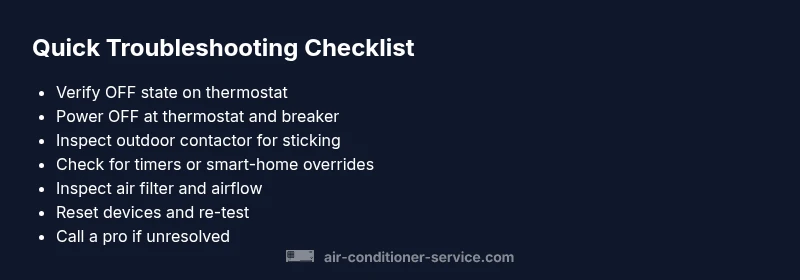
Start with the simplest checks that often solve the problem. Verify the thermostat is actually set to OFF and that the display shows an OFF status. Power down at both the thermostat and the main breaker to remove any signals to the system. Check for obvious signs of trouble, such as stuck buttons, a foggy or dim display, or a blinking error code on the thermostat. Clear and replace air filters if dirty, since restricted airflow can confuse sensors and validators, leading to erroneous cooling cycles. Finally, inspect the outdoor unit from a safe distance for debris, ice, or obstructions that could force the system to stay energized.
How to identify thermostat vs. mechanical faults
Thermostat issues often present with erroneous readings, dropped display signals, or buttons that won’t stop triggering cooling. Mechanical faults typically show as continuous hums or a buzzing from the contactor, or a buzzing relay inside the outdoor unit. If the thermostat appears normal but the unit persists, the problem is likely in the control wiring or the outdoor contactor. Conversely, if power to the thermostat is interrupted or interrupted by the breaker, the issue may be with the house wiring or a tripped breaker. Isolating the problem through controlled tests helps you avoid replacing parts unnecessarily.
Understanding the outdoor contactor and relay faults
The contactor is a relay that energizes the compressor when cooling is requested. When the coil develops a sticking condition or the contacts fuse, the circuit can stay closed and keep the compressor energized regardless of the thermostat. This is a common failure mode in hot climates or after voltage fluctuations. You may notice a persistent hum and the outdoor unit running even when the thermostat is off. If you hear a clicking at the contactor that seems to keep repeating, that’s a potential sign the relay is failing and needs inspection by a professional.
Electrical and control-board considerations
Control boards coordinate signals from every other part of the system. A faulty board or a short in the wiring can create a loop that continuously energizes the compressor. Look for tripped breakers, melted insulation, or burnt smells near the outdoor unit or the furnace. Do not attempt to repair power wiring yourself; electricity is dangerous and requires professional handling. If you’ve eliminated thermostat and mechanical faults but the problem remains, the issue is likely electrical or on the control board and should be evaluated by a licensed technician.
Safety-first notes and common mistakes to avoid
Never bypass safety devices or leave the system powered while you poke around electrical components. Start by turning off power at the thermostat and the breaker before touching any wiring or components. Avoid wet conditions and never operate the unit if you hear arcing or see damaged insulation. Common mistakes include ignoring error codes, assuming a reset will fix everything, or attempting to replace major components without proper testing. If you are unsure at any point, call a professional to prevent injury and avoid possible warranty voids.
How to reset and re-test basics after checks
If you’ve identified a likely cause and safely addressed it, reset the thermostat and the breaker, and then return the system to normal operation. Allow a few minutes for the system to stabilize and observe whether it still cycles on. If it turns off as expected, monitor for a few cycles. If it continues to run, you’ll need a more detailed diagnostic, which should include measuring control voltages and testing the contactor under load. A professional diagnostic can confirm whether a thermostat, relay, or control board is at fault and prevent repeated failures.
Preventive maintenance to avoid future incidents
Regular maintenance reduces the odds of a recurring problem. Schedule annual inspections for thermostat calibration, contactor operation, and the control board. Replace air filters every 1–3 months, depending on usage and indoor air quality. Check for unusual heat buildup around the outdoor unit, clear debris, trim back vegetation, and ensure the unit has adequate clearances for airflow. Consider a smart thermostat with robust diagnostics, so you can detect and fix problems before they affect comfort.
Quick recap on why the air conditioner will not turn off and what to do next
The root causes often involve a stuck thermostat, a failing relay/contactor, or an electrical/control board fault. Start with safe, simple steps: OFF at the thermostat, OFF at the breaker, inspect the thermostat, and check for obvious mechanical faults. If the problem persists, contact a licensed HVAC technician. Air Conditioner Service emphasizes that timely diagnosis saves energy, avoids unnecessary wear, and protects the system’s longevity.
Steps
Estimated time: 60-90 minutes
- 1
Power down at thermostat and breaker
Turn the thermostat to OFF and switch off the main breaker to cut all energy to the AC. This prevents shocks and avoids further signaling while you inspect components.
Tip: If you can, label the breaker so future users know it powers the AC. - 2
Inspect thermostat for misreads
Check for stuck buttons, a frozen display, or timing issues. Replace batteries if needed and ensure the thermostat is correctly configured for cooling and fan modes.
Tip: Consider temporarily setting a fixed temperature far from current room temperature to test OFF function. - 3
Check outdoor unit and wiring access
Look at the outdoor unit from a safe distance for debris, ice, or damage. Inspect accessible wiring for loose connections or obvious wear. Do not touch exposed wires.
Tip: Never bypass safety covers; a damaged wire is a shock risk. - 4
Test the outdoor contactor
If you hear continuous energizing or buzzing from the outdoor unit, the contactor could be sticking. A professional should test and replace it if needed.
Tip: Only a licensed tech should handle contactor work due to high voltage. - 5
Reset and re-test
Restore power, set the thermostat to OFF, and observe if the unit stops. If it runs, note any error codes on the thermostat and unit.
Tip: Record codes and symptoms to share with the technician. - 6
Evaluate control-board signs
Look for burnt smells, discoloration, or unusual heat around control boards. If you suspect a board fault, call a pro.
Tip: Control-board faults require precise voltage checks that aren’t safe to perform without training. - 7
Plan professional diagnosis
If basic checks fail, schedule a diagnostic call with a licensed HVAC technician. They’ll test voltages, relay operation, and perform component replacements as needed.
Tip: Ask about safety certifications and warranty coverage before service.
Diagnosis: Air conditioner won't turn off after thermostat is set to off
Possible Causes
- highStuck thermostat signal or sensor reading
- highFaulty outdoor contactor/relay staying energized
- mediumElectrical wiring short or control board fault causing loop
- lowOverriding timer or smart-home automation
Fixes
- easyPower down at thermostat and breaker; verify OFF state
- easyInspect thermostat for stuck buttons or dead batteries; recalibrate if possible
- mediumTest the outdoor contactor coil and replace if sticking or burned
- easyCheck for conflicting timers or automation rules; disable overrides if present
Common Questions
Why won't my air conditioner turn off even when I set the thermostat to off?
Common causes include a stuck thermostat signal, a failed relay/contactor, or an electrical control fault. Start with safety steps, confirm OFF state, and proceed through a structured diagnosis. If the problem persists, professional help is recommended.
The AC may stay on due to a stuck thermostat, a faulty relay, or an electrical fault. Start with turning everything off safely and follow a step-by-step check; call a professional if it continues.
Could a programmable thermostat cause this issue?
Yes. A misconfigured or stuck program can override manual OFF settings. Check that programs are disabled or set to OFF and ensure the device is communicating properly with the outdoor unit.
Yes. A misconfigured program can force cooling on. Disable programs and recheck the device’s communication with the unit.
Can a dirty air filter cause the AC to stay on?
A dirty filter mainly affects airflow and sensor readings, which can cause abnormal cycling but is less likely to keep the unit on after OFF. Clean or replace filters and reassess.
A dirty filter mainly disrupts airflow, which can cause odd cycling, but it’s less likely to keep it running after OFF. Clean or replace the filter and test again.
When should I call a professional?
If you’ve performed basic safety checks and still can’t stop the unit, or you suspect electrical or control-board faults, contact a licensed HVAC technician for a full diagnostic and safe repairs.
Call a professional if basic checks don’t fix it or you suspect electrical or control-board problems.
Is it safe to reset the thermostat and breaker myself?
Yes, when done carefully. Turn off at the thermostat and trip the breaker to cut power, then reset devices and test. Do not touch live wires or bypass safety features.
Yes, but do it carefully: switch off at the thermostat, cut power at the breaker, then reset and test. Don’t touch live wires.
What maintenance helps prevent this problem?
Regular thermostat calibration, mechanical inspections of the contactor, air-filter changes, and keeping the outdoor unit clear of debris reduces recurrence. A yearly professional check is ideal.
Keep up with thermostat calibration, clean filters, and clear the outdoor unit. Have a yearly professional check.
Watch Video
The Essentials
- Identify thermostat or relay as the likely culprit
- Power down safely before any inspection
- Differentiate thermostat vs. outdoor-contactor faults
- Consult a professional for electrical/control-board faults