How to Use a Daikin Air Conditioner Remote
Master how to operate a Daikin AC remote with this practical guide. Learn button layout, modes, temperature, fan and swing settings, eco features, battery care, and quick troubleshooting.


With this guide you’ll learn to operate a Daikin air conditioner remote confidently. Start by confirming you have the correct remote for your model and fresh batteries. You’ll learn how to turn the unit on, switch modes, adjust temperature, set fan speed, control the swing, and enable energy-saving features for comfortable, efficient cooling or heating.
Understanding the Daikin Remote Layout and Models
According to Air Conditioner Service, most Daikin remotes share a familiar layout across model lines, though button names and features vary slightly. The core cluster typically includes Power, Mode, Temperature Up/Down, Fan, Swing, and a digital display. Newer remotes may add Eco, Turbo, and Sleep buttons. Identify your model first, then consult the manual for exact mappings. This knowledge helps you locate controls quickly during everyday use and avoids guesswork when you need to adjust settings in a hurry.
Battery Basics and Model Variations
Battery choices depend on the model; some Daikin remotes use standard AAA cells, others rely on a coin-type battery. You’ll usually find the correct type printed inside the battery compartment or on the back label. Always use fresh, high-quality batteries and replace them promptly when performance wanes. If you replace batteries but the remote still won’t respond, consider re-syncing with the indoor unit by re-pairing according to the manual or Air Conditioner Service’s troubleshooting tips.
Operating Basics: Turning On, Off, and Adjusting Temperature
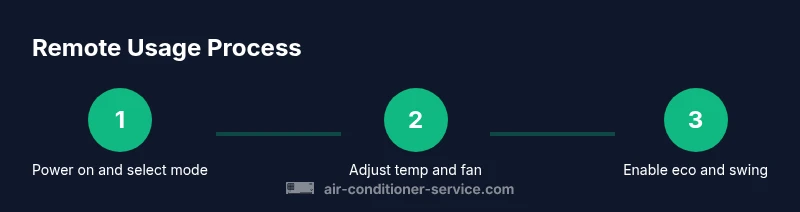
Powering on and off is the first step to any operation. Once powered, use the Mode button to select from Cool, Heat, Dry, or Fan depending on your climate and comfort needs. The Temperature Up/Down keys adjust the setpoint. For quickest comfort, set a target temperature within your comfort range and observe how the display confirms the new setting. Keep in mind that some models require you to press Energy Saving or Eco to enable certain efficiency features.
Using Modes, Fan Speeds, and Swing
Mode selection changes the system’s behavior. Cool lowers air temperature, Heat warms, Dry dehumidifies, and Fan circulates air without cooling. Adjust the Fan speed for comfort—Low for quiet operation, High for rapid changes, and Auto to let the system pick the best speed. The Swing button controls the louvers direction; use it to distribute air front-to-back or left-to-right, depending on your room layout. Some remotes include a direct Turbo mode for fast cooling.
Energy-Saving Features, Sleep Mode, and Scheduling
Enabling Eco or Energy Saver helps reduce consumption by adjusting compressor cycles. Sleep mode gradually changes temperature to suit overnight comfort, often in stages. If your model supports it, you can program a basic schedule through the remote, or use the unit’s timer settings to start cooling or heating at a chosen time. These features are especially useful in daily routines and can yield meaningful savings over time.
Troubleshooting Common Remote Issues and Maintenance
If the remote seems dead, check the batteries first and ensure the IR emitter isn’t blocked by fingers or a case. Clean the IR window with a soft, dry cloth and avoid moisture. If the IR sensor on the unit seems unresponsive, test with another Daikin remote if available to confirm the issue is not the device. Periodic cleaning and battery care can extend the life of the remote and keep signals reliable.
Tools & Materials
- Daikin remote control(Match the remote to your Daikin model)
- Batteries (fresh)(Check model for type; use quality alkaline or lithium)
- User manual / model-specific guide(Helpful for model-specific functions)
- Soft cloth for IR window(Keep the sensor clean to ensure good signaling)
Steps
Estimated time: 20-30 minutes
- 1
Inspect the remote and batteries
Open the battery compartment and verify the type of batteries required. If needed, replace with fresh cells and ensure correct orientation. This step prevents weak signals and intermittent response.
Tip: If the battery contacts look corroded, replace the remote instead of forcing batteries. - 2
Power on the AC from the remote
Point the remote at the indoor unit and press the Power button. If the unit doesn’t respond, try a second attempt from a closer distance and remove any obstructions.
Tip: Maintain a clear line of sight, about 15 feet (4-5 meters) in typical rooms. - 3
Select a mode and set a baseline temperature
Tap Mode to choose Cool/Heat/Dry/Fan. Then use Temperature Up/Down to set a comfortable target and observe the display confirmation.
Tip: Start with a neutral setpoint (around 72°F or 22°C) and adjust from there. - 4
Adjust fan speed and louvers
Use the Fan button to cycle speeds and Swing to control the louvers direction. Auto mode lets the system optimize airflow.
Tip: Face louvers towards the occupant’s seating area for even distribution. - 5
Enable energy-saving features
If available, press Eco or Energy Saver to reduce compressor cycles and improve efficiency. Combine with Sleep mode for nightly comfort.
Tip: Eco mode is most effective when outdoor temps are moderate. - 6
Troubleshoot non-responsive signals
Check batteries, clean the IR window, and try re-pairing if your model supports it. Use a second remote to verify whether the issue is with the unit or the remote.
Tip: Document symptoms to reference when seeking support. - 7
Close with routine maintenance
Wipe the IR window, store the remote away from heat and moisture, and replace batteries at the first sign of reduced range. Regular maintenance saves signal headaches.
Tip: Keep a spare battery kit in your toolkit.
Common Questions
How do I reset my Daikin remote?
If the remote stops responding, remove the batteries, wait 30 seconds, reinsert them, and test. If it still fails, re-pair the remote with the indoor unit following the manual.
Reset by removing the batteries, waiting briefly, reinsert, and test.
Why won't the Daikin remote turn on the AC?
Check the batteries, ensure clear line of sight to the indoor unit, and verify the unit is not in a locked or child-proof mode. If needed, try another remote to rule out a unit fault.
Make sure the batteries are fresh and the remote has a clear signal path to the indoor unit.
How do I replace the batteries in a Daikin remote?
Open the battery compartment, remove old batteries, insert new ones in the correct orientation, and reassemble. If the remote still doesn’t work, verify model compatibility and try re-pairing.
Open the back, swap in fresh batteries in the right direction, and test again.
Can I pair a Daikin remote with a new Daikin unit?
Pairing procedures vary by model. Consult the manual or Air Conditioner Service’s troubleshooting guide for step-by-step re-pairing instructions specific to your unit.
Pairing depends on the model; follow the manual for steps to re-pair with a new unit.
What do the different modes on the Daikin remote do?
Modes include Cool, Heat, Dry, and Fan. Each mode changes how the system handles temperature, humidity, and airflow. Refer to your manual for model-specific details and button mappings.
Modes control how the unit behaves—cool, heat, dry, or fan—depending on your climate.
Watch Video
The Essentials
- Know the remote layout and model variations
- Battery quality impacts response and range
- Master basic operations before changing modes
- Energy-saving features can reduce costs
- Regular maintenance prevents remote issues