Air Conditioner Is Not Turning On: Troubleshooting Guide
When your air conditioner won't turn on, this practical guide helps homeowners diagnose common causes and apply safe fixes. Learn step-by-step checks, when to call a pro, and prevention tips to avoid future startup problems.


Most startup failures are due to power or thermostat problems. Start by checking the breaker, outlet, and thermostat settings. If power is present but the unit still won’t turn on, inspect the outdoor disconnect and capacitor. If you smell burning, hear buzzing, or see visible damage, stop and call a professional immediately.
Why Your Air Conditioner Might Not Turn On
If the air conditioner is not turning on, you’re dealing with a problem that can range from a tiny, easy fix to a safety concern. The most common causes are power issues (a tripped breaker or blown fuse), thermostat misconfigurations, or simple unit-specific faults like a dirty filter or a non-responsive control board. Start with the simplest checks you can perform without special tools, then progressively move to more involved inspections. Homeowners who approach this calmly reduce the risk of electrical hazards and can often restore cooling without a service call. Remember, safety comes first: never probe live electrical connections and always cut power before touching major components.
Thermal safety and system protection rely on predictable behavior. If the thermostat is controlling the AC but nothing happens when you press the start button, the culprit is frequently a miscalibrated temperature setting, a stale remote signal, or a battery that needs replacement. If the outdoor unit is silent while the indoor fan runs, you may have a condo/house wiring issue, a faulty contactor, or a damaged capacitor. In any case, documenting what you observe helps a technician identify the fault quickly.
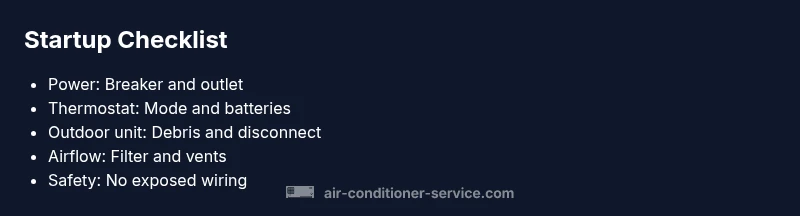
Consider environmental and usage factors: people often forget seasonal power surges, humidity, and dust can affect startup. A clogged air filter reduces airflow, causing the system to struggle at startup or shut down due to protection features. A quick snapshot checklist—power, thermostat, airflow, filters—often reveals the root cause without specialized tools.
In short, expect power and thermostat issues to be the leading causes, with other problems like capacitor faults and contactor wear being less common but still important to identify early. If you are uncomfortable with any step that involves electrical components, contact a licensed HVAC technician.
30-190 words?
Steps
Estimated time: Estimated total time: 45-60 minutes
- 1
Confirm power to the system
Begin by locating the main electrical panel and the dedicated AC breaker. If the breaker is tripped, flip it fully to OFF, then return to ON. Check the external outlet and any power strips involved with the indoor unit. Test the thermostat and remote control to ensure signals are reaching the system.
Tip: If the breaker trips again, you likely have a short or overload—do not continuously reset it. - 2
Check thermostat and controls
Inspect the thermostat for correct mode (cool) and an appropriate setpoint. If using a programmable thermostat, verify that the schedule isn’t overriding settings. Replace remote batteries if applicable and try a manual button on the thermostat.
Tip: Dim or unreadable displays can indicate a faulty power supply to the thermostat; address that first. - 3
Inspect outdoor unit access
Go outside and look at the unit for obvious issues: loose wiring, debris, or a tripped disconnect. If you hear buzzing or see visible damage, do not touch live components and call a pro.
Tip: Clear debris around the unit to restore airflow, but avoid sticking objects into the grille. - 4
Check the air filter and indoor airflow
A clogged filter reduces airflow and can prevent startup protections from allowing operation. Replace or clean the filter, then recheck indoor fan movement and airflow from vents.
Tip: Always turn the power off before touching any internal parts. - 5
Inspect capacitors and contactors (if safe)
If you are trained and comfortable, inspect the capacitor and contactor in the outdoor unit for signs of bulging, discharge, or pitting. Only handle capacitors with caution and discharge them properly if you know how.
Tip: If you notice a pops or a hissing sound, call a pro immediately. - 6
Test start and observe behavior
Restore power and attempt a controlled start. Note whether the indoor fan runs, whether the outdoor fan engages, and whether there are unusual noises. If the unit still won’t start, document observations for your technician.
Tip: Keep a log of symptoms to speed up diagnosis.
Diagnosis: Air conditioner won't start or respond to thermostat
Possible Causes
- highPower issue (tripped breaker, blown fuse, outlet no power)
- mediumThermostat misconfiguration or dead batteries
- lowBlown capacitor or faulty contactor in outdoor unit
Fixes
- easyReset the circuit breaker and verify outlet power to the AC unit.
- easyCheck thermostat settings, ensure mode is cool and target temperature is reachable; replace thermostat batteries if remote control is used.
- mediumInspect outdoor disconnect and capacitor if safe to do so; look for obvious signs of damage or buzzing.
Common Questions
Why won't my air conditioner turn on even though the thermostat shows power?
This can indicate a thermostat misconfiguration, dead batteries, or a control wiring issue. Verify mode is set to cool, check the display for errors, replace batteries if used with a remote, and ensure the thermostat is communicating with the main unit.
If your thermostat shows power but the AC won’t start, check its mode and batteries, then confirm it’s communicating with the outdoor unit.
Can a blown fuse or tripped breaker prevent startup?
Yes. A blown fuse or a tripped breaker cuts power to the AC. Reset the breaker and replace any blown fuses. If the breaker trips again, there may be a short or overload in the circuit.
A tripped breaker or blown fuse stops the unit from starting—reset and check insulation and wiring for issues.
Is it safe to reset the thermostat or AC system?
Resetting the thermostat is generally safe if done according to the manual. For the outdoor unit, a controlled power cycle can help but avoid frequent resets if you notice repeated startup failures.
Yes, you can reset the thermostat and do a controlled power cycle, but avoid repeated resets if problems recur.
When should I call a professional for startup problems?
If you smell burning, hear buzzing, see signs of damage, or the breaker keeps tripping, stop and call a licensed HVAC technician. Also seek help if you’re uncomfortable working with electrical components.
Call a pro if you notice burning smells, buzzing sounds, or repeated breaker trips.
What maintenance can prevent startup problems in the future?
Regularly replace or clean air filters, schedule seasonal inspections, and keep outdoor units clear of debris. Keep thermostat batteries fresh and ensure proper airflow to minimize startup issues.
Regular filter changes and seasonal checkups reduce startup problems and keep the system running efficiently.
Watch Video
The Essentials
- Check power first and reset breakers if needed
- Verify thermostat is set correctly and controls are responsive
- Inspect outdoor unit for safety issues before touching electrical parts
- Clean or replace filters to improve airflow and startup reliability
- Document symptoms to streamline professional diagnosis