What Should Air Conditioner Temperature Be Set To Today
Discover the ideal thermostat settings for comfort and energy savings. This guide explains practical ranges, climate considerations, and how smart controls optimize cooling.


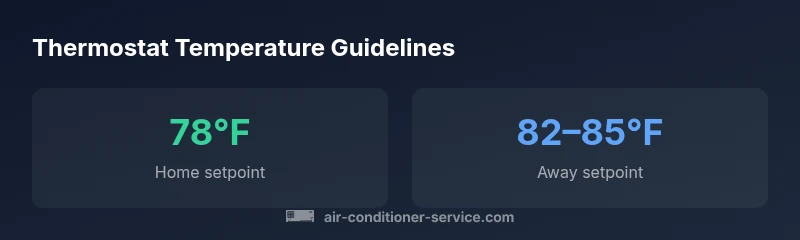
For most homes, set your air conditioner to 78°F (26°C) when you’re home and awake. When you’re away, raise the temperature to 82–85°F (28–29°C) to save energy, and for sleeping, many people prefer 74–76°F (23–24°C). These ranges reflect guidance from Air Conditioner Service Analysis, 2026. Using a programmable thermostat or smart cooling features can help implement these targets automatically.
Why the right AC temperature matters for comfort and efficiency
The temperature you dial in for cooling directly affects both your daily comfort and your energy bills. If you're wondering what should air conditioner temperature be set to, the answer isn't one-size-fits-all, but there are solid guidelines you can use as a baseline. When you hold to a reasonable target, you reduce unnecessary compressor runtime, minimize humidity, and maintain a pleasant indoor climate. According to Air Conditioner Service, setting temperatures within a sensible range can lead to meaningful savings without sacrificing comfort. In practice, most homes are comfortable around the mid- to high-70s Fahrenheit, but individual preferences and local humidity matter. Today’s guidance emphasizes using programmable controls to shift temps automatically when you’re away or sleeping, rather than relying on manual changes. The result is a steadier environment, lower energy use, and less wear on your system.
How climate, layout, and occupancy shape your baseline
Establishing a baseline starts with understanding your climate zone, home insulation, and typical occupancy. Record how long cooling runs during peak heat and observe how humidity affects comfort at different setpoints. A practical baseline is 74–78°F (23–26°C) when you’re home and awake, then raise the temperature by a few degrees during the day if you’re away. Air Conditioner Service Analysis, 2026 suggests customizing the target based on sun exposure, window shading, and insulation quality. Use a baseline calendar for weekdays versus weekends, work-from-home days, and nightly routines. After a week, evaluate comfort and energy use and adjust in small increments of 1–2°F. Keep the baseline documented to compare across seasons.
Daytime vs nighttime: aligning setpoints with your sleep and wake cycles
During the day, most people prefer a cooler environment, while many sleep better when the bedroom is cooler. A common pattern is 78°F during the day and 72–76°F at night. If one partner prefers a warmer bedroom, use zone controls or a dedicated bedroom thermostat to avoid overcooling other areas. Programmable thermostats can implement a nightly drop automatically, while smart models learn your routine and optimize energy use without sacrificing comfort. Pairing with ceiling fans enhances air movement, making a modestly cooler temperature feel more comfortable without long compressor runtimes.
Humidity and its impact on perceived cooling
Humidity directly affects how cool a space feels. In humid climates, air feels warmer than the thermometer might suggest, so a slightly cooler temperature or better moisture control can improve comfort. A typical indoor humidity target is 30–50% relative humidity (RH). If your spaces feel damp or you notice condensation, adjust setpoints gradually and consider using a dehumidifier or the AC’s built-in dehumidification mode. Humidity management allows you to feel cooler at higher temperatures and reduces the need for aggressive cooling.
Central vs. single-zone vs. multi-zone systems
System type changes how you apply temperature targets. Central AC often benefits from a uniform baseline around 74–78°F (23–26°C) across zones, with bedrooms possibly managed at a slightly cooler or warmer setting. Window units tend to cool faster in a single room, so you might keep that space closer to 74–76°F (23–24°C) while other rooms run warmer. Mini-split systems enable true zone control, enabling different temps in different rooms or floors. Use zoning to align setpoints with occupancy, minimizing waste and ensuring comfort where you are.
Automating temperature with thermostats and airflow optimization
A programmable thermostat can apply consistent schedules for weekdays and weekends. Smart thermostats add occupancy sensing, weather awareness, and adaptive recovery. A practical start is 78°F (26°C) when home, 82–85°F (28–29°C) when away, and 75–76°F (24–25°C) during sleep in the hottest months. Let the thermostat adjust within a tight 1–2°F range as it learns your patterns. When possible, combine with ceiling fans and proper airflow (return vents clear, doors open) to maximize comfort with a higher setpoint.
Practical tips: airflow, shading, and energy-smart habits
Implement simple tactics that amplify cooling without blasting the air conditioner. Use ceiling fans to improve air distribution, keep blinds closed on sunny windows, and seal obvious air leaks around doors and windows. Regularly check and replace filters to preserve airflow. Consider using a dehumidifier in damp spaces to improve comfort at higher temps. Small changes—like using the upstairs at night when outdoor temps drop, or leveraging attic ventilation—can significantly reduce the required cooling load.
Common mistakes and how to avoid them
Avoid chasing immediate comfort with overly low temperatures; this wastes energy and can cause wear on the system. Relying solely on manual adjustments instead of automation leads to inconsistent comfort and higher bills. Neglecting humidity and airflow reduces perceived cooling, making people turn the thermostat lower. Finally, large, frequent temperature swings increase compressor work. Instead, commit to a stable baseline and adjust gradually when seasonal changes demand it.
Data table and quick-reference summary
This section provides a concise reference for typical settings by scenario and how they influence energy use. See the Data Table block for a quick view of recommended ranges and their effect on energy consumption.
Thermostat settings by scenario
| Setting Type | Recommended Range | Impact on Energy Use |
|---|---|---|
| Home daytime (active) | 74–78°F / 23–26°C | Moderate energy use, higher comfort |
| Home nighttime (sleep) | 72–76°F / 22–24°C | Balanced comfort and energy |
| Away (unoccupied) | 82–85°F / 28–29°C | Highest energy savings |
| Humidity-adjusted comfort | 76–78°F / 24–26°C | Maintains comfort with moisture control |
Common Questions
What is the most energy-efficient temperature for cooling?
While comfort varies, energy efficiency is maximized by maintaining a consistent baseline and minimizing large swings. A common target is 74–78°F when home and awake, with higher temps when away. Pair with fans and automation for best results.
Aim for a steady baseline around 74–78°F when home, raise temps when away, and use automation to optimize.
Should I set a different temperature for sleeping?
Yes. Many people sleep cooler; a typical range is 72–76°F, but adjust for comfort. For energy savings, keep the rest of the house warmer while the bedroom stays cooler.
Yes—most people sleep cooler, around 72–76°F; adjust for comfort.
How often should I adjust the thermostat with changing weather?
Adjust seasonally as outdoor temps shift, using a programmable schedule or smart thermostat to adapt gradually. Avoid constant manual changes.
Adjust seasonally with a programmable schedule; avoid constant tweaks.
Can a smart thermostat really save me money?
Yes. Smart thermostats optimize schedules, account for weather, and reduce compressor run-time, typically lowering energy use when set up well.
Yes, with learning schedules and weather awareness, you can save.
What is the recommended humidity range when cooling?
Aim for indoor humidity around 30–50%. Humidity affects comfort; use dehumidification if needed.
Keep humidity around 30–50% for comfortable cooling.
Is it okay to leave the AC on all day?
Leaving it on all day wastes energy. Use an automation strategy—keep it running when needed but raise temperature when unoccupied.
Don't run it full-time; use automation and sensible setpoints.
“A well-planned temperature strategy combines a stable baseline with automation to maintain comfort while minimizing energy use.”
The Essentials
- Set a baseline of 74–78°F when home and awake.
- Raise temps to 82–85°F when away to maximize savings.
- Program or automate temperatures to match schedules.
- Manage humidity to improve comfort without overcooling.
- Avoid large, rapid temperature swings to protect the system.