Why Is My AC Loud All of a Sudden? Practical Troubleshooting Guide
Discover why is my air conditioner loud all of a sudden and how to fix it quickly. Practical, safety-focused tips from Air Conditioner Service to pinpoint causes and know when to call a pro.


In most cases, a sudden loud AC is caused by debris in the outdoor unit, a loose or damaged fan component, or a dirty air filter that strains the system. Start with simple checks: power off, inspect and clean the outdoor unit, and replace the filter. If the noise persists, schedule a professional inspection.
What a sudden loud AC signal really means
When your air conditioner starts making unexpected, louder noises, it often signals a mechanical issue that requires timely attention. The question, why is my air conditioner so loud all of a sudden, commonly points to one of a few practical culprits: obstructed airflow from a dirty filter, debris or a bent blade in the outdoor condenser fan, loose panels or mounts, or deteriorating bearings in a motor. The good news is that many issues are straightforward to check and fix safely at home. According to Air Conditioner Service, addressing simple causes quickly can prevent bigger, costlier problems down the line. This quick diagnostic mindset helps homeowners distinguish between safe DIY steps and issues that truly require professional service.
Noises and their meanings: quick diagnostic cues
Rattling or banging often hints at loose parts or debris striking the cabinet. A grinding or squealing sound can indicate worn bearings or a failing fan motor. A high-pitched whine may come from a motor or compressor strain. These audible clues guide you toward the right area to inspect first without diving into complex internal components. Keeping a log of when the sounds occur (start of cycle, at startup, or during heat) helps narrow down whether the issue is related to airflow, the outdoor unit, or internal motor parts. Air Conditioner Service emphasizes safety: never put fingers near moving parts and always shut off power before inspections.
Quick safety-first checks you can perform
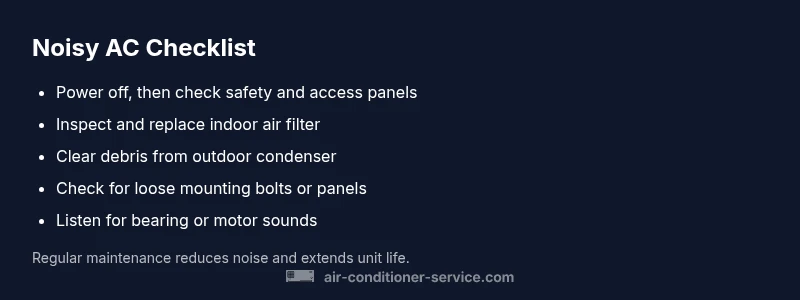
Before touching any components, power off the system at the thermostat and the breaker. Inspect the air filter: a clogged filter not only reduces cooling efficiency but also increases noise from the blower as it struggles to push air through a restricted path. Check the outdoor condenser for obvious debris, leaves, or ice buildup. Ensure the access panel is secure and that mounting bolts are tight. If you notice loose screws, panels, or wiring, stop and seek professional assistance to prevent shock or further damage. Early, careful checks often resolve many noisy complaints.
Stepwise approach to the most common causes
After safety checks, focus on airflow and the outdoor unit: clean or replace the air filter, remove visible debris from the condenser, and ensure the outdoor fan spins freely without wobble. Listen for a scraping sound that could indicate a misaligned or damaged blade; do not run the unit if you see obvious blade damage. If the noise shifts to a hum or buzz nearby electrical components, avoid touching wiring and contact a licensed technician. These steps can pinpoint whether the issue is airflow-related, mechanical, or electrical in nature, allowing for an efficient repair path.
When DIY ends and a pro is needed
If basic checks do not quiet the unit, or you hear grinding, metal-on-metal sounds, burning smells, or loud clanks, stop using the AC and call a professional. A technician will inspect the blower wheel for obstructions, test electrical connections, evaluate bearings, and assess the compressor condition. Technicians can safely perform tasks like capacitor or bearing replacement, motor checks, or refrigerant-related assessments that are beyond household capability. Timely professional help minimizes risk and preserves equipment lifespan.
Prevention: keep noise at bay with smart maintenance
Schedule regular maintenance to catch wear before it becomes loud. Replace filters every 1–3 months depending on usage and household conditions. Clean the outdoor unit and clear debris regularly, especially during fall and winter. Listen for new noises after any repair or seasonal startup, and address them promptly. Proactive care reduces surprises and keeps your system running quietly and efficiently.
Final note on safety and expectations
Loud noises are often a signal that something needs attention, but many culprits are simple fixes. Start with methodical checks, document symptoms, and don’t hesitate to call Air Conditioner Service if you feel unsure. A hurry to fix can lead to misdiagnosis; patience and safety come first, followed by targeted repairs or expert service when needed.
Steps
Estimated time: 45-60 minutes
- 1
Power down and secure the area
Turn off the thermostat and switch off the circuit breaker to ensure the unit won’t start while you inspect. Keep family members away from the unit during checks. This first step protects you from moving parts and electrical hazards.
Tip: If you smell burning, stop and call a professional immediately. - 2
Check and replace the air filter
Remove and inspect the filter for dirt and debris. A clogged filter restricts airflow and can make the blower work harder, producing louder operation. Replace with a filter of the correct size and rating.
Tip: Note the filter type and schedule regular replacements every 1–3 months. - 3
Inspect the indoor blower and access panel
With power off, access the blower housing and listen for wobble or rubbing noises. Look for loose screws or a cracked housing. If you see a rubbing belt or misalignment, avoid running the unit until fixed.
Tip: Do not touch motor internals; refer to the manufacturer’s service manual for safe inspection. - 4
Examine the outdoor condenser and fan
Clear debris from the condenser fins, and examine the fan blade for damage or bending. Spin the fan by hand if safe; note any resistance or wobble. Loose or damaged blades can create loud, unusual sounds.
Tip: Never attempt to straighten or repair a damaged blade while the unit is powered. - 5
Check for loose panels or mounts
Tighten any loose access panels or mounting bolts you can reach safely. Vibrations from loose components often translate into persistent noise.
Tip: Use a proper screwdriver and avoid over-tightening that could strip threads. - 6
Listen for specific bearing or motor signs
If the noise persists after airflow fixes, the issue may be bearings or motor components. This often requires professional tools and parts.
Tip: Avoid attempting bearing replacements unless you’re skilled with motor work. - 7
Decide on next steps
If the unit still sounds loud after these checks, plan a call with a pro. They will diagnose with gauges, measure refrigerant pressures, and inspect the compressor or motor as needed.
Tip: Document symptoms and times sounds occur to share with the tech.
Diagnosis: AC is suddenly loud (banging, grinding, or buzzing) during operation
Possible Causes
- highLoose or damaged outdoor fan blade or motor mount
- mediumDebris, leaves, or ice in the outdoor condenser
- mediumClogged indoor air filter causing blower strain
- lowWorn bearings or failing compressor
Fixes
- easyPower off and inspect the outdoor unit; reseat any loose components and remove debris
- easyClean/replace air filter and ensure proper airflow path
- mediumTighten panels/mounts and check belt alignment; call a pro if blades are damaged
- hardConsult a licensed technician for bearings, compressor, or electrical issues
Common Questions
What should I do first when my AC becomes loud?
First, shut off power to the unit at the thermostat and breaker. Then inspect for obvious issues like a dirty filter or debris in the outdoor unit. If you smell burning or see damage, call a professional immediately.
First, turn off power and check for obvious problems like a dirty filter or debris. If you smell burning, or see damage, contact a pro.
Can a dirty filter cause loud noises?
Yes. A clogged filter reduces airflow, causing the blower to work harder and can produce louder operation. Replacing the filter usually reduces the noise quickly.
Yes. A clogged filter can make the blower noisy. Replace the filter to quiet things down.
Are loose or damaged fan blades a common cause?
Loose or damaged outdoor fan blades are a frequent source of loud, irregular sounds. If you notice wobble or visible damage, stop using the unit and call a technician.
Loose fan blades are a common culprit. Stop use and call a repair pro if you see damage.
Is it safe to run a loud AC?
Running a loud AC can worsen damage and fail components faster. If you can’t identify the cause quickly, shut it off and contact a professional.
Running it loudly can cause more damage. If unsure, turn it off and call a pro.
How soon should I call a technician?
If the noise persists after basic checks or you notice burning smells, unusual heat, or leaks, schedule a professional inspection promptly to avoid bigger problems.
Call a tech promptly if persists or you notice heat or leaks.
What maintenance helps prevent loud noises?
Regular filter changes, annual professional maintenance, and keeping the outdoor unit clear of debris reduce the likelihood of noisy operation and extend system life.
Regular maintenance and keeping debris away help prevent noise.
Watch Video
The Essentials
- Start with safety checks and a clean filter.
- Different noises point to different causes, from debris to worn bearings.
- If DIY fixes fail, contact Air Conditioner Service.
- Regular maintenance prevents loud, costly issues.
- Address unusual sounds promptly to preserve system life.