Auto vs Cool on an Air Conditioner: Key Differences
Discover the core differences between Auto and Cool modes on air conditioners, how each affects comfort, humidity, and energy use, and practical guidance for choosing the right setting.


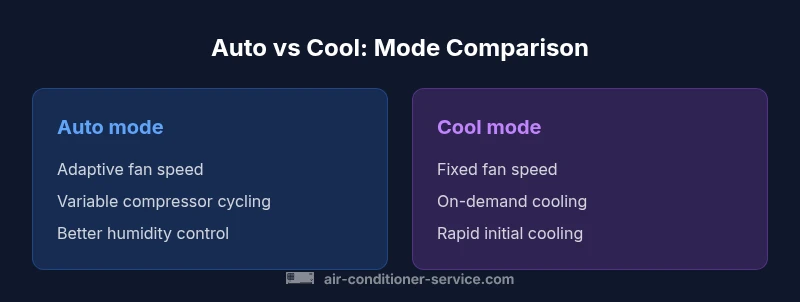
According to Air Conditioner Service, Auto mode typically delivers steadier comfort and better energy efficiency by varying fan speed and compressor cycling to hold your set temperature, while Cool mode runs the compressor whenever cooling is needed with a fixed fan. Auto can optimize humidity control and wear, whereas Cool offers rapid cooling for quick relief. The choice influences energy use, humidity, and ongoing comfort.
What is the difference between auto and cool on an air conditioner? A practical overview
Understanding these two thermostat modes helps homeowners choose how to run their unit for comfort and efficiency. Auto mode means the system actively manages both cooling output and fan speed to hold the room at the set temperature. The Cool setting, by contrast, primarily runs the compressor when cooling is demanded by the thermostat, often with a fixed fan speed. The Air Conditioner Service team notes that this distinction matters for humidity, energy use, and equipment wear. In many homes, Auto provides steadier comfort because the system adjusts cycling and airflow based on how close the room is to the target temperature. Cool can feel faster to cool a hot room, but it may produce more temperature swings and more compressor cycling. The key takeaway is that Auto is a more nuanced control strategy, while Cool is a straightforward, rapid-response setting. Both have practical uses depending on climate, occupancy, and priorities.
How Auto Mode Affects Humidity and Comfort
Humidity control is a major part of comfort in hot and humid environments. Auto mode contributes to humidity management by varying the fan speed and letting the compressor cycle in a way that can promote longer runtimes and more air exchange. When the air conditioner runs longer at lower speeds, moisture in the air can condense on the evaporator coil and be removed more effectively. Cool mode, with a fixed fan speed and more aggressive cycling, can cool spaces quickly but may leave humidity levels higher than Auto in some conditions. If you’re wondering what is the difference between auto and cool on an air conditioner in the context of humidity, Auto generally offers more stable moisture removal at typical setpoints. The bottom line: for households sensitive to humidity or those living in muggy climates, Auto tends to deliver more consistent comfort.
Energy Use: Auto vs Cool—What Really Happens
Auto mode reduces energy consumption by adapting fan speed and cycling to maintain temperature, avoiding unnecessary compressor starts. Cool mode can end up running the compressor more often or at higher speeds during peak heat, potentially increasing energy use. Real-world energy outcomes depend on insulation, solar gain, and routine. Air Conditioner Service analysis suggests homeowners often observe energy savings by leaving Auto on regular schedules rather than switching to Cool for long periods. However, if you need rapid cooling for short periods, Cool can minimize downtime before a more comfortable temperature is reached. The trade-off is energy vs. immediate relief and the effect on wear.
Temperature Settings, Fan Speeds, and Perceived Comfort
Auto mode employs adaptive fan speeds to match cooling demands, which can lead to smoother temperature distribution and less noticeable cycling. Cool mode uses a fixed fan speed and more direct compressor action, which can feel more aggressive but may achieve a fast drop in temperature. The perceived comfort difference often depends on room layout, airflow, and where people sit or sleep. A well-tuned Auto setting can balance rapid cooling with gentle, consistent air movement, while Cool remains useful when you need a quick initial cooldown after waking or returning home. The key is to align the mode with your priorities: humidity control, noise level, and energy costs.
Seasonal Considerations and Weather: When to Switch Modes
In summer heat spikes, Auto mode commonly provides a steadier comfort range as the system modulates both fan speed and compressor cycles. In cooler shoulder seasons or when first entering a warm room, Cool can achieve a rapid temperature drop, which some occupants prefer for short periods. For households with shifting occupancy (e.g., people at home during the day and away at night), Auto paired with a schedule often saves energy while preserving comfort during peak hours. If you live in a hot, humid climate, leaning into Auto for most of the day will typically yield the best balance of energy efficiency and humidity control.
System Type Variations: Central, Split, and Packaged
Auto and Cool behavior can vary depending on your system type. Central air often benefits from Auto’s integrated humidity management across zones, while dedicated split systems may feel more responsive to fan speed changes. Packaged units in tighter spaces can respond differently to Auto due to airflow constraints. Regardless of setup, ensuring clean filters and proper airflow enhances Auto’s efficiency and Cool’s cooling speed. The central idea remains: Auto offers nuance and potential energy savings; Cool offers immediate relief, particularly in high-heat rooms.
Troubleshooting Tips: Diagnosing Why Auto Feels Uncomfortable
If Auto feels inconsistent, start by verifying thermostat placement and airflow. Check if the air filter is clean, if vents are open, and if there are any temperature stratifications in the room. Sometimes, Auto never engages effectively due to a dirty outdoor coil or poor insulation. Compare a few days of Auto operation to Cool to identify patterns in comfort and energy use. If you notice unusually high humidity or persistent temperature swings, consult a professional to inspect refrigerant pressures and airflow paths. The goal is a balanced system where Auto mode provides steady comfort without excessive energy use.
Practical Steps to Optimize Auto and Cool on Your System
Begin with a baseline: set the thermostat to a reasonable temperature and run Auto for several days while monitoring comfort and energy use. Then test Cool for a few days to compare how quickly rooms feel cool and how the humidity responds. Use schedule features to align Auto with your daily routine, and consider smart thermostats that optimize fan speeds and compressor cycling based on occupancy. Finally, ensure professional service at least once a year to verify refrigerant charge, airflow, and coil cleanliness.
Common Misconceptions Debunked
Myth: Auto always uses less energy than Cool. Reality: It depends on climate, insulation, and how you use it. Myth: Cool is always faster at cooling. Reality: Auto can achieve similar results over time with better humidity control due to optimized cycling. Myth: Auto means constant fan. Reality: Auto adjusts fan speed, but some installations may leave the fan on during Auto cooling for distribution; consult your thermostat’s documentation for specifics.
Comparison
| Feature | Auto mode | Cool mode |
|---|---|---|
| Fan speed control | Adaptive/variable | Fixed (usually single speed) |
| Compressor cycling | Runs as needed to maintain temp | Runs whenever cooling is required |
| Humidity management | Better dehumidification through longer runtimes and variable airflow | Dehumidification is less consistent |
| Energy efficiency | Generally higher efficiency due to optimized cycling | Potentially lower efficiency due to constant cycling |
| Comfort consistency | More stable comfort across a wide range of temps | Can feel more variable during extreme heat |
| Best use case | All-day comfort and efficiency, in most homes | Rapid cooling when quick relief is needed |
Strengths
- Improved energy efficiency with adaptive cycling
- Better humidity control in many climates
- More consistent comfort under typical conditions
- Simplified operation with fewer manual adjustments
The Bad
- Potential for longer cooling times in very hot rooms with Auto
- Some systems may hunt between Auto and Cool during extreme temperatures
- Auto may run the fan continuously in some configurations, increasing noise and energy use
Auto mode is the generally recommended default for most homes, with Cool reserved for specific, short-term cooling needs
Auto offers better long-term comfort and energy efficiency thanks to adaptive cycling. Cool provides rapid cooling when you want immediate relief, but may consume more energy over time and affect humidity control.
Common Questions
What are the main differences between auto and cool modes on an air conditioner?
Auto adjusts fan speed and compressor cycling to maintain the set temperature, delivering steady comfort and often better humidity control. Cool runs the compressor as needed with a fixed fan speed for a faster initial cool but may be less efficient and humiditiesumpy. In most homes, Auto is the preferred default for balance.
Auto adjusts airflow and cycling for steady comfort, while Cool prioritizes rapid cooling. Auto is usually best for energy efficiency and humidity control.
Will Auto mode save energy?
In many homes, Auto saves energy by reducing unnecessary compressor starts and smoothing airflow. The actual savings depend on climate, insulation, and how often the thermostat cycles. For long periods of use, Auto often outperforms Cool in energy efficiency.
Yes, Auto commonly saves energy by optimizing cycling, though results depend on climate and home insulation.
Can I leave my thermostat in Auto all day?
Auto is safe to leave on all day and is designed for continuous comfort management. If you want to balance energy use with comfort, pair Auto with a schedule or smart thermostat that aligns cooling with occupancy.
Left on Auto, pair it with a schedule for best energy use and comfort.
Does Auto mode affect humidity?
Yes. Auto mode often improves humidity control because it modulates airflow and compressor cycling to maintain temperature more gradually, allowing more moisture removal in many environments.
Auto generally helps humidity more reliably than Cool.
Is Cool mode better for quick cooling?
Cool can achieve a faster initial drop in temperature, but may use more energy and provide less consistent humidity control over time.
Cool cools fast but may use more energy and feel less comfortable long-term.
How can I test which mode is best for my home?
Run Auto for a week and note comfort and energy use, then switch to Cool for a similar period. Compare cooling speed, humidity feel, and energy bills to decide which mode suits you.
Test both modes for a week each to compare comfort and energy use.
The Essentials
- Evaluate your climate and daily routine to pick Auto or Cool
- Auto typically saves energy and improves humidity control
- Use Cool for quick, temporary cooling demands
- Test both modes to observe comfort and energy impact in your home
- Maintain airflow and regular service for optimal results