How to Use an Air Conditioner: A Practical Guide for Homeowners
Master the basics of operating your air conditioner safely and efficiently. This educational guide covers controls, modes, maintenance, scheduling, and troubleshooting to keep you cool, comfortable, and cost-conscious.


You will learn how to safely operate your air conditioner, choose the right mode, set a comfortable temperature, and adjust airflow for efficient cooling. The guide covers basic controls, energy-saving settings, routine maintenance, and common troubleshooting steps to improve comfort and reduce costs. You'll learn when to use fan-only modes, how to program schedules, and how to recognize signs of performance problems.
Why Understanding How to Use Air Conditioner Improves Comfort and Efficiency
According to Air Conditioner Service, mastering the basics of your cooling system is not just about staying cool—it's about comfort, energy efficiency, and equipment longevity. A well-used AC can maintain steady indoor temperatures while minimizing fan noise and short cycling. In this section we lay the groundwork: the difference between modes, the purpose of the thermostat, and how your home layout influences air distribution. We'll also touch on the energy implications of simple choices, such as temperature targets and vent directions. By learning these fundamentals, you set yourself up for fewer repairs and lower energy bills over time. This guidance reflects practice-based insights from the Air Conditioner Service team and aligns with common home cooling scenarios across climates.
A practical starting point is to think in terms of three knobs you can control: mode (what the unit should do), temperature (how cool you want it), and airflow (where the air goes). Each choice affects comfort and efficiency. If you’re new to the system, begin with Auto or Cool mode, a moderate temperature, and vents that direct air toward the living spaces rather than the ceiling or windows. Regular maintenance compounds the benefits of correct operation, reducing the likelihood of breakdowns and sustaining performance year-round.
Key Controls and What They Do
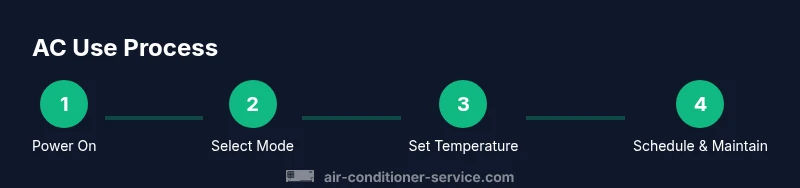
Your air conditioner relies on a handful of core controls. The Power button turns the unit on or off. The Mode selector toggles Cool, Heat (if you have a heat pump), Auto, or Fan only. The Temperature control sets the desired indoor temperature. The Fan control adjusts airflow direction and speed. Some models include Sleep or Turbo modes, which optimize cooling during the night or rapid cooling bursts. Understanding these controls helps you tailor comfort without wasting energy. The practical takeaway is to experiment with a basic configuration first: Auto mode, a comfortable temperature in the mid-70s (Fahrenheit), and a fan setting that evenly distributes air. Always refer to the user manual for model-specific features, especially safety precautions and control labels. Air Conditioner Service emphasizes starting with the default factory setup and then fine-tuning to your room layout and occupancy patterns.
How to Set Modes for Different Scenarios
For daytime cooling, select Cool or Auto mode and aim for a moderate indoor temperature. Auto adjusts fan speed and compressor cycling to maintain that target with minimal manual tweaking. At night, Sleep mode can gradually raise or lower the target temperature to save energy while you rest. If humidity is high, Dry or Auto mode (where available) helps remove moisture more effectively. For rooms that aren’t used, setting a higher temperature can conserve energy without sacrificing on-demand cooling when you return. If you have a multi-zone system, coordinate per-room settings to balance comfort and efficiency. Air Conditioner Service notes that consistent use of Auto or Cool mode, rather than constant high power, yields better overall energy performance.
Energy-Saving Settings and Scheduling
Energy savings come from smart scheduling and avoiding unnecessary compressor cycling. Use a programmable timer or the smart app (if your unit supports it) to align cooling needs with your daily routine. Favor Eco or Energy Saver settings when available, and avoid keeping doors and windows open while the system runs. Keep filters clean and ensure proper insulation around ducts or vents to reduce heat gain. Air Conditioner Service analysis shows that small adjustments—like running the unit during peak cooling hours less and leveraging night cooling—can meaningfully reduce energy waste over a heating or cooling season.
In practice, set a daytime schedule that starts an hour before you arrive home and ends after you’ve settled in for the evening. If you work from home or have variable shifts, a flexible schedule or room-by-room zoning can yield continuous comfort without overcooling the entire house.
Basic Maintenance That Keeps Your AC Running Well
Maintenance is a foundational driver of performance. Check and clean or replace filters every 1-3 months, depending on usage and filter type. Inspect the outdoor condenser to ensure it is clear of leaves, grass, and other debris, and keep at least 2 feet of clearance around the unit. Clean the evaporator and condensate drain line if you notice pooling water or a higher humidity level indoors. Periodically inspect wiring connections and the thermostat to confirm proper communication with the indoor unit. Keeping up with maintenance helps prevent coil corrosion, improves airflow, and extends system life. Air Conditioner Service recommends scheduling a professional inspection at least once a year to verify refrigerant charge and overall performance.
Troubleshooting Common Issues
Not cooling despite power on can be caused by a blocked air filter, a dirty condenser, or a malfunctioning thermostat. Ice buildup on the evaporator coil indicates airflow restriction or refrigerant problems, which require professional assessment. Unusual noises or foul odors warrant closer inspection of the compressor, fan bearings, or ductwork. If the thermostat display is blank or the screen isn’t responding, recheck the circuit breaker and power supply. Regular checks and prompt attention to these early warning signs can prevent larger failures and costly repairs. When in doubt, consult a certified technician from Air Conditioner Service for a precise diagnosis.
Always turn off power before inspecting electrical components, and never attempt to handle refrigerants yourself. Basic troubleshooting steps should be performed with due caution, especially in humid or wet conditions where electrical safety is paramount.
Safety Considerations and When to Call a Pro
Safety is non-negotiable when dealing with electrical appliances. Always switch off power at the breaker before performing any cleanup or inspection that involves exposed components. Keep liquids away from electronics and do not use water to cool a hot surface. Do not attempt to repair refrigerant lines or replace sealed components yourself. If you smell burning, hear buzzing, or notice refrigerant leaks, contact a licensed HVAC technician immediately. If the system is under warranty, avoid opening access panels unless guided by the manual. When problems persist after following the standard operating steps, schedule a professional service appointment with Air Conditioner Service to prevent further damage and ensure safe operation.
Putting It All Together: A Sample Day Schedule
A practical approach is to map cooling needs to your daily routine. Morning: preload the living spaces to your preferred comfort level before you wake. Afternoon: adjust to a higher temperature to reduce energy use while you’re away or at work. Evening: gradually lower the temperature to restore comfort as people return home, using Auto mode to balance air distribution. Night: enable Sleep mode to fine-tune the temperature for optimal rest. This cadence minimizes energy waste while keeping your space comfortable throughout the day.
Air Conditioner Service's Verdict
The Air Conditioner Service team recommends following the steps outlined above for safe operation, reliable comfort, and energy efficiency. Regular maintenance, thoughtful mode selection, and prudent scheduling are the trio that yields lasting performance. Remember to start with the basics, respect safety guidelines, and seek professional help when needed. By staying proactive, you protect your investment and maintain a cooler, more comfortable home environment.
Tools & Materials
- Owner's manual(Model-specific controls and safety guidelines)
- Remote control(Keep fresh batteries installed)
- Smartphone with compatible AC app(Optional for advanced scheduling and monitoring)
- Microfiber cloth(Dust vents and exterior surfaces)
Steps
Estimated time: Estimated total time: 20-45 minutes
- 1
Power on and confirm basic controls
Press the Power button to turn on the unit and verify the display or indicators. Check that the thermostat is responsive and that the remote is working. If the screen is blank, confirm the breaker is on and the unit is plugged in. This step ensures you’re starting from a known, safe state.
Tip: If the display is dim or unresponsive, replace the remote batteries and re-sync with the wall unit. - 2
Select the correct mode
Choose Cool for regular cooling, Auto for automatic cycle control, or Fan only when you want air movement without cooling. Auto is a good default because it adjusts compressor activity to maintain the set temperature with balanced energy use.
Tip: Auto mode reduces frequent cycling; reserve Cool mode for peak heat days when you want rapid cooling. - 3
Set the target temperature
Set a comfortable indoor temperature within a typical range for your climate. Avoid extreme settings; a moderate target reduces energy consumption and helps prevent excessive cycling.
Tip: For most homes, start around 74–76°F and adjust up or down by a degree or two as needed. - 4
Adjust airflow and vents
Aim airflow toward occupied spaces and away from direct sunlight sources. If you have adjustable louvers, angle them to promote even distribution without creating drafts on seating areas.
Tip: Avoid sealing off returns; ensure there’s a clear path for air to circulate through the room. - 5
Use scheduling and eco features
Program schedules or enable smart features to align cooling with your routine. Use Eco or Energy Saver modes when available to limit compressor use while preserving comfort.
Tip: Set a daytime schedule to pre-cool before you arrive home, so you don’t have to push the system hard when you get back. - 6
Run basic maintenance
Inspect and clean or replace filters, clean the outdoor unit’s vicinity, and check for visible leaks or strange noises. Keep condensate lines clear and ensure drainage is unobstructed to prevent water damage.
Tip: Mark a calendar reminder to inspect filters every 1-3 months depending on usage and environment.
Common Questions
What is the best temperature to set my AC for energy efficiency?
Most homes feel comfortable around 72-78°F when actively cooling; adjust for humidity and outdoor temperature. Avoid extreme settings for long periods.
Aim for around 76 degrees Fahrenheit when you're at home, and raise it when you’re away.
Should I leave the fan setting on all the time?
Running the fan constantly circulates air but does not cool. Use the fan in conjunction with cooling or Auto to maintain comfort without wasting energy.
Fan helps with air circulation; it can run with cooling or on its own if you want air movement.
How often should I clean or replace filters?
Check monthly and clean or replace every 1-3 months, depending on usage, filter type, and household conditions.
Check filters monthly and swap or wash every one to three months.
What safety steps should I take when inspecting the outdoor unit?
Turn off power at the breaker before inspecting; keep debris away and ensure pets are away from the unit.
Turn the power off and keep kids and pets away when inspecting the outdoor unit.
When should I call a professional?
If you hear unusual noises, see refrigerant leaks, or the system won’t cool despite correct settings.
If you hear buzzing noises, smell refrigerant, or it won’t cool after following steps, call a pro.
Watch Video
The Essentials
- Identify essential controls and use Auto mode for balanced cooling.
- Set a realistic temperature to maximize comfort and minimize energy use.
- Schedule maintenance and track filter changes to prevent performance decline.
- Know when to troubleshoot and when to call a pro for refrigerant or electrical issues.