Air Conditioner On or Off: A Practical Troubleshooting Guide
Learn when to turn your air conditioner on or off with practical steps, energy-saving tips, and troubleshooting guidance for homeowners and renters. Includes thermostat programming and seasonal considerations.


To decide whether to run your air conditioner or switch it off, focus on occupancy, temperature, humidity, and energy use. Start by setting a comfortable target temperature, then use a timer or smart thermostat to avoid continuous running. Turn off the unit when you’re away for extended periods to save energy and protect the environment.
Context and why this decision matters
According to Air Conditioner Service, deciding when to run your air conditioner versus turning it off is a core part of comfort and efficiency. The choice affects energy bills, indoor air quality, and equipment wear. By understanding how occupancy, outdoor conditions, and humidity interact with your system, you can use your cooling more effectively and reduce unnecessary energy use. In practical terms, a thoughtful on/off strategy can keep your home comfortable without overspending on electricity or overworking the compressor. This article provides a simple, repeatable framework you can apply, with real-world examples and checks we recommend at Air Conditioner Service to help homeowners and renters optimize cooling across seasons.
Beyond comfort, safety and equipment health matter. Regularly reviewing your on/off routine can reduce frequent cycling, which may wear components prematurely. The following sections lay out a decision framework, explain how to test adjustments safely, and offer a plug-and-play method you can adopt today.
Key factors that influence on/off decisions
Choosing when to run the AC hinges on several overlapping factors. First is occupancy: if no one is home for large blocks of time, it often makes sense to raise the setting or switch off the system to save energy. Outdoor temperatures and humidity levels also matter; extremely hot or humid days may justify longer cooling runs, while mild days may not. Energy costs and your utility plan influence the economics of running vs. turning the system off. Thermostat capabilities—manual, programmable, or smart—determine how precisely you can automate on/off cycles without sacrificing comfort. Finally, indoor air quality and humidity control should guide decisions, because turning off cooling entirely can raise humidity, affecting comfort and health. A balanced approach keeps humidity in check while avoiding wasteful cycling, and it’s easier with a simple log of settings over a week to spot patterns.
Seasonal guidelines for homes and renters
Seasonal changes shift the baseline for on/off decisions. In summer, occupancy patterns (workdays, weekends, vacations) and weather variability drive the need for adaptive schedules. Renters often rely on apartment layouts or shared walls; vertical space, sun exposure, and window treatments can amplify heat gain, altering your optimal strategy. In shoulder seasons, milder days may allow extended periods of off, with cooling only during peak heat. For homes with multiple zones, it can be practical to leave zones unconditioned where nobody is present and focus cooling on frequently used areas. The goal is to pair real-world usage with the thermostat’s scheduling capabilities to minimize waste while keeping rooms comfortable when occupied.
Smart thermostats and automation
Smart thermostats bring precision to on/off decisions. They can learn your schedule, adjust for outdoor temperatures, and execute pre-programmed routines without manual input. Geofencing can start cooling automatically when you approach home and reduce load when you leave. Adaptive recovery features help avoid large temperature swings by gradually returning to the target setpoint. If you have multiple zones, consider zone control and separate schedules to avoid cooling unused spaces. Regular app checks ensure settings align with your current routines and occupancy.
Common myths and reality checks
Myth: Keeping the AC on at a low level all day saves more energy than turning it on and off. Reality: Consistent operation often wastes energy due to oversized cooling needs and humidity buildup; turning off or raising setpoints during unoccupied times can be more efficient. Myth: Higher cooling needs must mean longer runtime. Reality: Proper insulation, shading, and airflow management can reduce the need for extended cooling. Myth: Programmable thermostats are useless if you’re home all day. Reality: Even constant occupancy benefits from schedules that mirror actual usage patterns and humidity control. Myth: Humidity only matters in basements. Reality: Humidity levels affect comfort and health in every room; alarms and dehumidification strategies may be needed on hot days.
A practical decision framework you can apply today
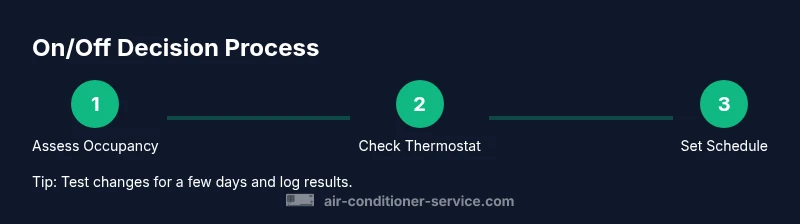
- Check occupancy: Is anyone home for the next 4–8 hours? If not, consider increasing the setpoint or turning off the AC if humidity is manageable. 2) Assess outdoor conditions: If it’s very hot and humid, a moderate run may be better than no cooling at all, especially for comfort. 3) Evaluate humidity: If humidity feels muggy, a temporary run with a higher setpoint can maintain comfort while controlling moisture. 4) Review efficiency: If your energy bill is high in peak hours, shift cooling to off-peak times using a smart thermostat. 5) Implement a test: Run a new schedule for 7–10 days and log comfort, humidity, and costs. 6) Adjust: Fine-tune setpoints and durations based on the data. 7) Document results: Keep a simple log to reuse successful patterns.
Tip: Start with a conservative adjustment and increase as needed. Warning: Avoid sudden large temperature swings after a long off period, which can stress the system and occupants.
How to test and adjust your settings safely
Testing changes gradually reduces risk and helps you observe genuine effects. Begin with modest setpoint changes (2–3°F) and note any comfort or humidity shifts over 2–3 days. Use a humidity gauge to confirm you’re not letting moisture rise, especially in kitchens and bathrooms where heat and moisture are common. If you notice moldy smells, condensation, or frost on outdoor lines, pause adjustments and check filtration and airflow. Regular maintenance—clean filters, check ducts, and ensure the condensate drain is clear—supports better performance when turning the system on or off.
Practical examples and quick-start checklist
- Example A: On a weekday when no one is home from 8 a.m. to 5 p.m., raise the thermostat by 3–4°F and rely on ceiling fans for comfort. - Example B: On weekends with family time in living areas, keep a moderate setting and use smart scheduling to pre-cool before arrival. - Quick-start checklist: Inspect filters, set a reasonable base temperature, enable off-peak scheduling, and log results for one week.
Tools & Materials
- Digital thermometer with humidity sensor(Display and log interior temperature and humidity levels)
- Smart thermostat or programmable thermostat(Enable scheduling and remote adjustment; supports off-peak modes)
- Owner's manual or access to the thermostat/app(Have model-specific instructions for setup and programming)
- Notepad or digital log(Record settings, comfort, and energy use over time)
Steps
Estimated time: 30-45 minutes
- 1
Assess current comfort and usage
Take a baseline reading of indoor temperature and humidity. Note which rooms feel comfortable and when humidity rises. This helps you decide whether to run continuously or rely on scheduled on/off patterns.
Tip: Record a 24-hour baseline to compare future changes. - 2
Check thermostat setting and mode
Review the current setpoint and mode (cool, auto, or eco). Ensure the device is correctly wired and that a schedule is enabled. If using a smart thermostat, confirm it is linked to your home Wi-Fi and the app has the latest firmware.
Tip: If using auto mode, verify how the unit responds to outdoor temperature changes. - 3
Set an initial schedule
Program a simple daily schedule: higher setpoints during unoccupied hours and a pre-cool before occupants return. Use a 2–4°F difference from your comfortable baseline to start.
Tip: Avoid large overnight swings; small adjustments prevent comfort shocks. - 4
Test and observe for 7–10 days
Run the schedule and monitor comfort, humidity, and energy use. Keep notes on how rooms feel and whether humidity remains acceptable.
Tip: Only change one variable at a time to isolate effects. - 5
Adjust setpoints based on data
If rooms are consistently too warm or humid, lower the setpoint or lengthen cooling windows slightly. If energy use remains high, optimize the schedule or check airflow.
Tip: Small, incremental changes yield clearer results. - 6
Perform a quick maintenance check
Clean or replace filters, inspect outdoor unit clearance, and verify condensate drainage is smooth. Poor airflow can waste energy and degrade comfort when the system runs.
Tip: Maintenance boosts efficiency and prolongs equipment life. - 7
Document results and set a routine
Create a short routine you can repeat seasonally. Document temperature, humidity, and energy trends to reuse proven patterns.
Tip: Keep your log accessible for future adjustments.
Common Questions
When should I turn off my AC to save energy?
Turn off or raise the setpoint when the home is unoccupied for extended periods (several hours). If humidity becomes uncomfortable, consider a shorter off period or a higher setpoint with dehumidification options. Always weigh comfort against savings and test changes over a week.
Turn off the AC when no one is home for several hours, but monitor humidity and comfort. If it gets stuffy, re-enable cooling in a measured way.
Is it better to leave the AC running all day if I’m at home?
Constant cooling can waste energy and wear the compressor. Use a schedule that aligns with occupancy, and rely on fans or natural ventilation during milder periods. In very hot climates, moderate, scheduled cooling is often more efficient than continuous operation.
If you’re at home, use a schedule that targets comfort while avoiding constant running; fans can help when it’s not extremely hot.
How can I program my thermostat to save energy without sacrificing comfort?
Use a gradual adjustment strategy: set higher temperatures during unoccupied times and pre-cool before you return. Enable adaptive recovery so the system doesn’t slam the temperature at once. Review and adjust weekly based on comfort logs.
Program gradual changes and pre-cool before you return home; let the thermostat learn your schedule.
What are the signs turning off/on affects and when should I test changes?
Watch for persistent humidity, uneven cooling, or rattling sounds when you adjust on/off patterns. If issues persist, verify filters, airflow, and duct leakage, and consider talking to a pro. Testing changes over 7–10 days helps you see real effects.
If humidity stays high or rooms feel stuffy after adjustments, review airflow and filters and test again.
How do humidity and indoor air quality factor into the decision?
Humidity affects comfort and health. In humid conditions, short, targeted cooling with dehumidification can be more effective than long continuous runs. Consider a dehumidifier or a thermostat with humidity control.
Humidity matters for comfort; use targeted cooling and consider dehumidification when needed.
Should renters adjust the thermostat without landlord approval?
Renters should follow building policies and use available controls responsibly. If you’re unsure, consult your lease or property manager. Many rentals support personal thermostat scheduling, but always verify restrictions.
Check your lease or building policies before making changes; many places allow personal scheduling within guidelines.
Watch Video
The Essentials
- Set a practical base temperature that balances comfort and energy use
- Program schedules to match occupancy patterns
- Use smart thermostats to automate on/off with minimal input
- Keep humidity in check to maintain comfort
- Maintain the system to sustain efficiency