Should You Turn Your AC Up When You Leave? A Practical Guide
Learn how to set your air conditioner when you’re away to save energy without sacrificing comfort. Practical strategies, safety tips, and renter vs. homeowner best practices from Air Conditioner Service.


Yes, you can adjust your thermostat when you leave, but a drastic temperature change isn’t always best. Use an energy-saving setting or away mode, keeping humidity in mind and avoiding extreme gaps that strain the system. Air Conditioner Service recommends a balanced approach: raise the temperature enough to reduce cooling load while preserving indoor air quality for when you return.
Understanding the core question: should you turn your ac up when you leave? The core question many homeowners ask is should you turn your ac up when you leave. The short answer depends on how long you’ll be away, the climate, and your indoor humidity targets. According to Air Conditioner Service, the goal is to minimize energy use while preventing humidity buildup and comfort problems when you return. In practice, most homes benefit from a deliberate switch to an energy-saving setting rather than a drastic temperature shift. In this section we’ll explore the logic behind away settings, the benefits of smart controls, and the trade-offs you should consider before adjusting the thermostat.
Energy-saving principles behind away settings. When you set your thermostat to a higher temperature during the day, your air conditioner runs less frequently, which reduces compressor cycles and saves electricity. However, a too-aggressive temperature change can backfire by letting humidity rise, mould risk, and comfort loss when you return. Air Conditioner Service analysis shows that the most effective approach combines a modest temperature lift with a smart scheduling pattern. In hot climates, a small increase of a few degrees while away can dramatically cut energy use, but you should avoid leaving the home completely unconditioned in humid seasons. Use energy-saving modes such as Away or Eco if your thermostat supports them, and pair these with efficient ventilation like ceiling fans to maintain air quality without overcooling.
Real-world scenarios: 4 hours vs 24 hours. For a short 4–6 hour absence in a moderate climate, you can typically maintain comfort by lifting the setpoint only modestly and relying on ceiling fans or dehumidifiers to manage comfort. In a 24-hour absence during hot weather, aim for a higher but safe temperature that reduces energy usage while preventing humidity buildup, mold risk, and equipment strain. The key is to avoid cycling the compressor on and off too aggressively, which wastes energy and can shorten equipment life. Always consider local humidity, sun exposure, and insulation when choosing a range.
Smart thermostats and away mode: a practical path. A smart thermostat with away mode or geofencing makes this easier and more reliable. Away mode keeps the home within a comfortable band while the system minimizes energy use. If you don’t have a smart thermostat, a programmable model with a schedule can approximate the same effect. The main advantage is reducing human error: the device follows a set plan even if you forget to adjust it.
How to physically implement this on common thermostats. Start by locating the away or eco mode in your thermostat menu. If your device supports geofencing, enable it so the system adapts when your phone leaves home. Set a reasonable away temperature range based on climate, humidity, and season. Save the settings and test them by simulating an away period for a short duration to observe how the system behaves. If humidity rises after you return, adjust to a more moderate target and re-test.
Common mistakes and how to avoid them. Do not set an extreme temperature gap (e.g., leaving the home unconditioned in humid weather). Avoid assuming that turning the AC off entirely will save energy; humidity and indoor air quality can suffer. Don’t forget to check airflow paths, door seals, and blinds; blocked windows can offset savings by trapping heat. For renters, confirm any thermostat limits in the lease and coordinate with property management to ensure you aren’t violating terms while still saving energy.
Renters vs homeowners: policy considerations and best practices. Renters often have limited control over thermostat settings, so they should use available modes and request approved adjustments if needed. Homeowners can implement flexible schedules, smart home integration, and routine checks. In both cases, pairing thermostat adjustments with fans and proper insulation helps maximize energy savings without compromising comfort or health. Air Conditioner Service’s guidance emphasizes planning, testing, and adjusting based on actual home performance.
Tools & Materials
- Smart thermostat or programmable thermostat(Essential for automating away mode or schedules)
- App access and internet connection(Needed to configure away modes remotely)
- Away-time schedule or set of trip details(Have your trip duration and climate details ready)
- Basic home energy planning notes(Jot down typical away durations and target ranges)
Steps
Estimated time: 15-25 minutes
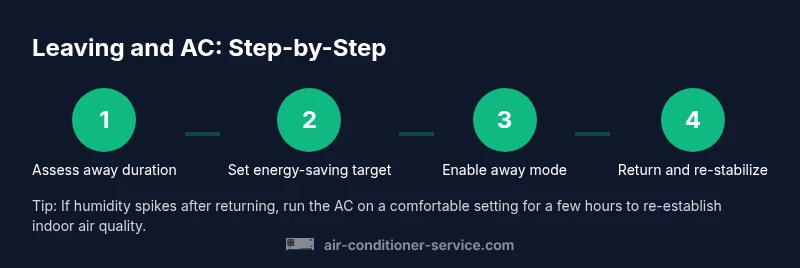
- 1
Assess away duration and climate
Determine how long you’ll be away and what the outdoor climate will be. This helps you pick a sensible temperature target that balances energy savings with humidity control.
Tip: Write down the expected away duration before adjusting settings. - 2
Choose an energy-saving target range
Based on the climate, select a temperature range that reduces cooling load but keeps humidity in check. In warm months, a modest lift is typically sufficient; in cooler months, avoid overcooling to prevent humidity issues indoors.
Tip: Avoid extreme gaps like turning off cooling entirely in humid weather. - 3
Enable away mode or schedule
Activate away mode on a smart thermostat or set a time-based schedule on a programmable model. This automates the plan so you don’t rely on memory or guesswork.
Tip: If you use geofencing, ensure your phone’s location services are enabled for reliability. - 4
Check humidity and airflow basics
Ensure there’s adequate humidity control, especially in humid climates. Use fans to improve air movement and keep doors open when appropriate to avoid stagnant air.
Tip: Close blinds to reduce heat gain if you’ll be away during sunny hours. - 5
Test and confirm before you leave
Run a short away-period test to observe how the system responds. Confirm the thermostat holds within the target range and that humidity levels don’t spike.
Tip: Note any nuisance cycling and adjust the target range accordingly. - 6
Return and readjust on re-entry
When you return, reset to a comfortable ambient setting and allow the system to stabilize. Reassess the schedule if you notice persistent humidity or comfort issues.
Tip: Give the system a few hours to re-stabilize after a long absence.
Common Questions
Should I turn the AC up before leaving for a short trip?
Yes, you can raise the temperature modestly and use away mode or a simple schedule to balance energy savings with comfort. Avoid large gaps that could worsen humidity or air quality.
Raise the temperature modestly and enable away mode for short trips to save energy without harming humidity or comfort.
Is it safe to leave the thermostat in away mode for a day?
Away mode is generally safe for a day, especially in mild weather. In hot or humid conditions, ensure the range isn’t too broad to prevent humidity buildup. Monitor dampness and adjust if needed.
Away mode is usually safe for a day, but avoid wide gaps in humidity-prone weather.
Will turning the AC up cause mold or humidity problems?
If the home remains outfitted with proper humidity control, small temperature increases reduce energy use without creating humidity problems. In very humid climates, too little cooling can promote moisture persistence, so use an appropriate range.
Too little cooling can invite humidity; pick a sensible range and use fans if humidity rises.
How do I set away mode on a common thermostat?
Open the thermostat menu, select away or Eco mode, and confirm the scheduled times. If you have a smart thermostat, input your away times so the device adjusts automatically.
Open settings, choose away or Eco mode, and confirm the times for automatic adjustment.
What should I do if I’m leaving during a heatwave?
During a heatwave, set the thermostat to a comfortable but energy-conscious range and use fans to help with air movement. Do not completely turn off cooling, as humidity management remains important.
In a heatwave, avoid turning off cooling; set a safe range and use fans.
Do renters have different rules for thermostat use?
Renters should follow the lease terms and coordinate with landlords or property managers. Use available modes and scheduling options to save energy while staying within allowed settings.
Follow the lease terms and use available thermostat modes to save energy.
Watch Video
The Essentials
- Use a balanced away setting to save energy without compromising humidity
- Smart thermostats simplify away-mode and save effort
- Humidity and air quality matter as much as temperature
- Test away settings before you travel
- Return-to-comfort routines ensure a smooth re-entry